pdfrx_web
pdfrx_web


A TypeScript PDF toolkit for the browser: a PDFium/WASM engine, a framework-agnostic canvas viewer, ready-made React UI, and collaborative editing support.
React demo · Vanilla demo · API reference · Documentation
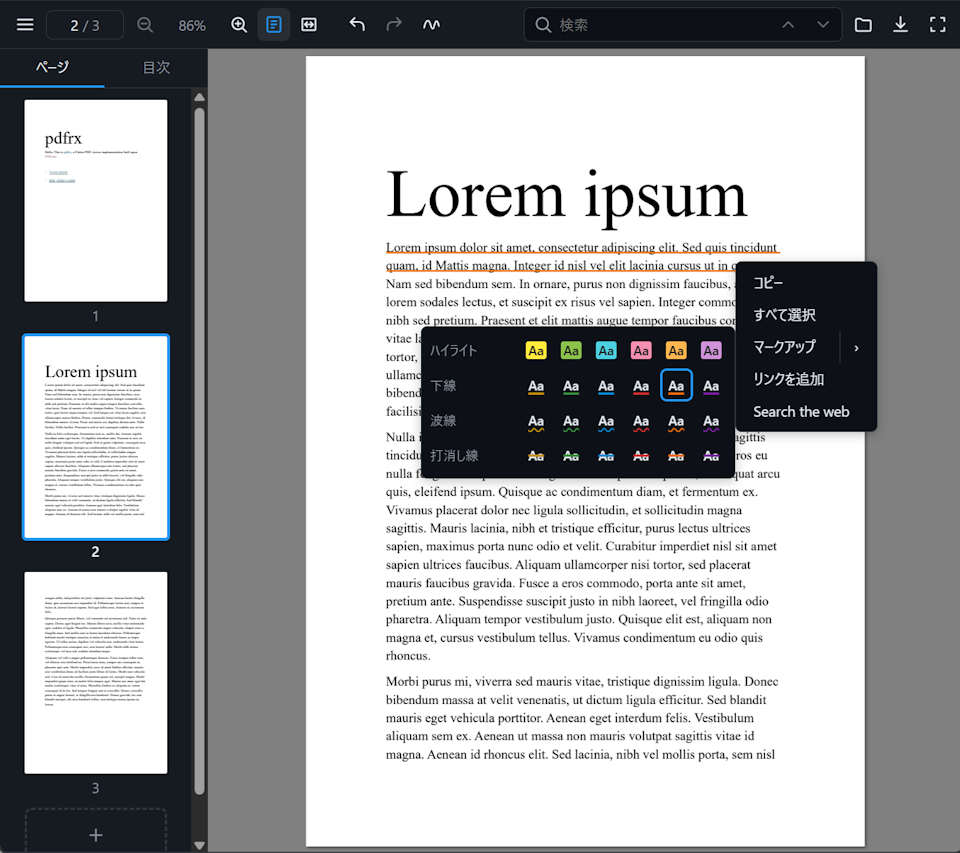
Choose a package
| Package | npm | Use it for |
|---|---|---|
@pdfrx/react |
npm | A ready-made React viewer, composable UI, or headless hooks. |
@pdfrx/viewer |
npm | A framework-agnostic canvas viewer or custom element. |
@pdfrx/engine |
npm | Rendering, extraction, editing, and encoding without viewer UI. |
@pdfrx/colab |
npm | Multi-user page, annotation, and form synchronization. |
@pdfrx/viewer-core |
npm | DOM-free geometry, layout, text, and selection logic. |
Higher-level packages install their lower-level dependencies automatically.
Most React applications should start with @pdfrx/react.
React quick start
npm install @pdfrx/react react react-dom
import { PdfrxViewerApp } from '@pdfrx/react';
import '@pdfrx/react/styles.css';

export function App() {
  return (
    <PdfrxViewerApp
      src="/manual.pdf"
      wasmModulesUrl="/pdfium/"
      style={{ height: '100dvh' }}
    />
  );
}
Copy pdfium_worker.js and pdfium.wasm from
node_modules/@pdfrx/engine/assets/ into your public /pdfium/ directory.
See the @pdfrx/react README for composition and API links.
Framework-agnostic quick start
npm install @pdfrx/viewer
<script type="module">
import { definePdfrxViewerElement } from '@pdfrx/viewer';
definePdfrxViewerElement();
</script>
<pdfrx-viewer
src="/manual.pdf"
wasm-modules-url="/pdfium/"
style="width: 100%; height: 100dvh"
></pdfrx-viewer>
See the @pdfrx/viewer README for the class-based API.
Remote PDF URLs must allow browser CORS access.
Features
- Sharp single-canvas rendering that re-renders at the active zoom, backed by a PDFium WASM worker with cancellable and partial-region rendering
- Desktop- and touch-friendly text selection, search, links, outline, thumbnails, animated navigation, and custom page layouts
- Interactive AcroForms plus annotation editing for ink, shapes, markup, notes, FreeText, images, snapping, and multi-selection
- One Undo/Redo history across annotations, forms, page insertion, deletion, reorder, duplication, and rotation
- Non-destructive PDF export that can preserve the live document and its edit history while encoding a temporary copy
- Ready-made responsive React UI, composable components, headless hooks, localization, theming, and framework-agnostic APIs
- Optional revision-checked collaboration with transient previews, authoritative late-join snapshots, and mixed-source PDF composition
- Browser, Node.js, Bun, and Deno support at the engine layer
Detailed behavior belongs in the topic guides and API reference.
Development
npm install
npm run build
npm test
npm run dev:react
Other examples use npm run dev and npm run dev:colab. See
AGENTS.md for
repository workflows and release requirements.
License
MIT — see LICENSE.